Кнопки цветные
Все элементы разметки записи в одном месте
 Просто ссылка на внешний ресурс ссылка на мой профиль
Что-то может быть удалено и выделено жирным или так: Никому не сообщайте этот ключ.
Что-то вверху или же внизу например. Тег cite выглядит так. А ещё acronym NBA или аббревиатура abbr AVE
тег button
тег a Link
input type="button"
Полезные ссылки: Типографика и жирная ссылка Тест обтеканий
Текстовые:
Цитата:
Так в чем успех онлайн сообществ?
Как найти подобных пользователей?
Как заслужить доверие и повысить лояльность пользователя?
code import. To show/hide an element I’ve chosen to create a radio button element. We’ll be using two parameters for the add_control() which means that the first.
Простой pre:
function unac_change_comments_callback( $type ) {
    $type['add_comment']['callback'] = 'unac_changed_get_add_comment';

    return $type;
}
wp-caption:

Эмодзи делают контекст выразительней с жирным выделением:
⚡ Важное замечание ⚡
Ссылка на мой канал:
YouTube: Подписаться на мой канал
Изображения:
 There is so much you can do with the customizer, I thought it would be a good idea to include some more examples. Let’s begin with some controls that govern the behavior of the button.
To show/hide an element I’ve chosen to create a radio button element. We’ll be using two parameters for the add_control() which means that the first one is a simple string, not a control object. The second parameter will have all the details the control needs to build the UI. Here’s the full code which should be placed in the cd_customizer_settings() function.
We’ve got a neat system but it would be a lot smoother if color changes and other edits would be instantaneous. Live previews allow us to use Javascript to selectively modify elements.
Просто по центру:

Шорткод:
[cwb_image]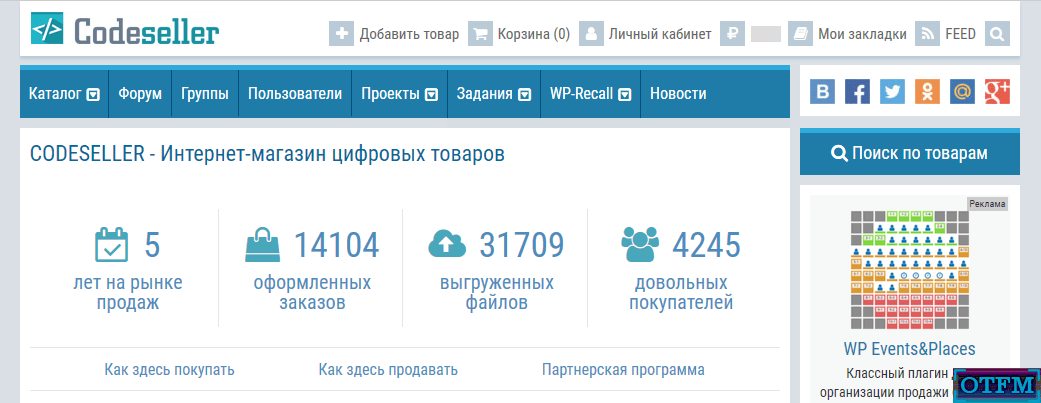 Внешний вид страницы CodeSeller[/cwb_image]
Списки
Упорядоченный список
- Анализ перед оптимизацией
- Запрос к api google fonts
- Конвертация .woff2 в .woff формат
- Способ редактирования шрифтов
Неупорядоченный список
- List Item 1
- List Item 2
- List Item 3
Вложенные
Имитация списка произвольной вёрсткой
1. Общие принципы хороших сайтов:
• Приятный дизайн
• Быстрая и бесперебойная работа сайта
• И удобство его использования
Список описаний. Термины
- Definition List Title
- This is a definition list division.
И второй:
- $user_LK (число)
- Содержит id юзера, в чьем кабинете находимся.
Код
Простой инлайн </body>например.
Простой pre:
function unac_change_comments_callback( $type ) {
    $type['add_comment']['callback'] = 'unac_changed_get_add_comment';

    return $type;
}
Однострочный без нумерации и шапки Fullwidth
rcl_get_option('$option_name', '$default')
Однострочный без нумерации и шапки PHP code
if( rcl_is_gutenberg() ) return false;markup для terminal
$ npm --versionPHP
if( is_admin() && !is_network_admin() ){
    require_once 'settings.php';
}
js
import './js/home.js';
import './js/user.js';
html
<script type="text/javascript" src="dist/build.js"></script>CSS
.fa{
     display:inline-block;
     font:normal normal normal 14px/1 FontAwesome;
}
 .fa.pull-left{margin-right:.3em}
CSS без заголовка
.fa{
     display:inline-block;
     font:normal normal normal 14px/1 FontAwesome;
}
Markup
{
  "name": "test-project",
  "version": "1.0.0",
  "description": "",
  "main": "index.js",
}
Таблицы
простая
| Table Header 1 | Table Header 2 | Table Header 3 |
|---|---|---|
| Division 1 | Division 2 | Division 3 |
| Division 1 | Division 2 | Division 3 |
| Division 1 | Division 2 | Division 3 |
специальная
| ФункцияИспользований | Codex | Developers | WP-Kama |
|---|---|---|---|
| __(57455) | |||
| _e(20171) | |||
| get_userdata(305) | |||
| get_settings(303)! deprecated | - |
Шорткод una-modal
[ una_post_modal id="2858" class="unam_small unam_success" text="Открыть" ]
youtube
обычный oembed
youtube jumper
[jmp_tube class="jmp_center" src="v0p0hb0C_Is" width="60" delay="20"]
[ jmp_tube class="jmp_center" src="v0p0hb0C_Is" width="60" delay="20" ]
[jmp_tube class="jmp_center" src="SttnGLN9gV4" width="90" delay="15" group="5909" caption="css и инструменты разработчика в браузере"]
[ jmp_tube class="jmp_center" src="SttnGLN9gV4" width="90" delay="15" group="5909" caption="css и инструменты разработчика в браузере" ]
SoundCloud
Спойлер
Demo - под катом:
Тут
Никаких скриптов. Html и css. Максимально простой и легкий.
Инфо cwb_info
Подпишитесь на бесплатное получение оффлайн варианта книги: "WP-Recall для новичка" в формате pdf.
Укажите свой e-mail, на который я вышлю вам эту книгу, как только она будет завершена.
Укажите свой e-mail, на который я вышлю вам эту книгу, как только она будет завершена.
Disclaimer
Disclaimer:
Эта запись - моё мнение. Оно может и не совпадать с вашим. Но я пытался быть максимально объективным.
TL;DR:
Хочешь видеть код - просто войди на сайт. Это дело пары минут, если ты не зареган; и еще быстрей, если зареган - просто залогинься.
Сноска
- Информация в чистом виде - это не знание. Настоящий источник данных - это опыт.
- • Альберт Эйнштейн
Note that this code should not be placed inside the cd_customizer_settings() like we did with controls, sections and settings.
This is all pretty standard stuff, the only thing to note is how the value is retrieved. The get_theme_mod() function will retrieve the current theme’s settings; the first parameter is the name of the setting, the second is the default value.
Seller on codeseller
[codeseller_product template="full-width" slug="christmas-time"]
[ codeseller_product template="full-width" slug="christmas-time" ]
Черновик. Тест обтеканий
Note that this code should not be placed inside the cd_customizer_settings() like we did with controls, sections and settings.
This is all pretty standard stuff, the only thing to note is how the value is retrieved. The get_theme_mod() function will retrieve the current theme’s settings; the first parameter is the name of the setting, the second is the default value.
The function can – of course – be used in the theme’s code to modify the functionality. We could – and soon will – create a control and setting that can be used to hide/display the button. We’ll use the get_theme_mod() will be used in the index.php file to selectively show/hide the button.
Live Previews
We’ve got a neat system but it would be a lot smoother if color changes and other edits would be instantaneous. Live previews allow us to use Javascript to selectively modify elements.
To get started, let’s create a customizer.js file and make sure it is enqueued.
Further Examples
There is so much you can do with the customizer, I thought it would be a good idea to include some more examples. Let’s begin with some controls that govern the behavior of the button.
Showing/Hiding Sections
To show/hide an element I’ve chosen to create a radio button element. We’ll be using two parameters for the add_control() which means that the first one is a simple string, not a control object. The second parameter will have all the details the control needs to build the UI. Here’s the full code which should be placed in the cd_customizer_settings() function.
Note that for now I’ve set the transport method to refresh. When the button is hidden it is not loaded at all on the page so we’d need to do more than just show/hide an element via JavaScript. We’ll learn how to do this even better soon!
Типографика
HTML - теги
What HTML tags would you like to see?
Let’s start with an unordered list:
- One
- Two
- Three
- Four
And then move on to a more interesting ordered list:
- one, two
- buckle my shoe
- three, four
- knock at the door
- Five, six
- pick up sticks
- Seven, eight, lay them straight
- Nine, ten, a big fat hen
- Eleven, twelve, dig and delve
- Thirteen, fourteen, maids a’courting
- Fifteen, sixteen, maids in the kitchen
- Seventeen, eighteen, maids a’waiting
- Nineteen, twenty, my platter’s empty …
ОСТАЛЬНОЕ:
The purpose of this HTML is to help determine what default settings are with CSS and to make sure that all possible HTML Elements are included in this HTML so as to not miss any possible Elements when designing a site.
Heading 1
Heading 2
Heading 3
Heading 4
Heading 5
Heading 6
Paragraph
Lorem ipsum dolor sit amet, test link adipiscing elit. Nullam dignissim convallis est. Quisque aliquam. Donec faucibus. Nunc iaculis suscipit dui. Nam sit amet sem. Aliquam libero nisi, imperdiet at, tincidunt nec, gravida vehicula, nisl. Praesent mattis, massa quis luctus fermentum, turpis mi volutpat justo, eu volutpat enim diam eget metus. Maecenas ornare tortor. Donec sed tellus eget sapien fringilla nonummy. Mauris a ante. Suspendisse quam sem, consequat at, commodo vitae, feugiat in, nunc. Morbi imperdiet augue quis tellus.
Lorem ipsum dolor sit amet, emphasis consectetuer adipiscing elit. Nullam dignissim convallis est. Quisque aliquam. Donec faucibus. Nunc iaculis suscipit dui. Nam sit amet sem. Aliquam libero nisi, imperdiet at, tincidunt nec, gravida vehicula, nisl. Praesent mattis, massa quis luctus fermentum, turpis mi volutpat justo, eu volutpat enim diam eget metus. Maecenas ornare tortor. Donec sed tellus eget sapien fringilla nonummy. Mauris a ante. Suspendisse quam sem, consequat at, commodo vitae, feugiat in, nunc. Morbi imperdiet augue quis tellus.
List Types
Definition List
- Definition List Title
- This is a definition list division.
Ordered List
- List Item 1
- List Item 2
- List Item 3
Unordered List
- List Item 1
- List Item 2
- List Item 3
Forms
Tables
| Table Header 1 | Table Header 2 | Table Header 3 |
|---|---|---|
| Division 1 | Division 2 | Division 3 |
| Division 1 | Division 2 | Division 3 |
| Division 1 | Division 2 | Division 3 |
Misc Stuff – abbr, acronym, pre, code, sub, sup, etc.
Lorem superscript dolor subscript amet, consectetuer adipiscing elit. Nullam dignissim convallis est. Quisque aliquam. cite. Nunc iaculis suscipit dui. Nam sit amet sem. Aliquam libero nisi, imperdiet at, tincidunt nec, gravida vehicula, nisl. Praesent mattis, massa quis luctus fermentum, turpis mi volutpat justo, eu volutpat enim diam eget metus. Maecenas ornare tortor. Donec sed tellus eget sapien fringilla nonummy. NBA Mauris a ante. Suspendisse quam sem, consequat at, commodo vitae, feugiat in, nunc. Morbi imperdiet augue quis tellus. AVE
Lorem ipsum dolor sit amet, consectetuer adipiscing elit. Nullam dignissim convallis est. Quisque aliquam. Donec faucibus. Nunc iaculis suscipit dui. Nam sit amet sem. Aliquam libero nisi, imperdiet at, tincidunt nec, gravida vehicula, nisl. Praesent mattis, massa quis luctus fermentum, turpis mi volutpat justo, eu volutpat enim diam eget metus. Maecenas ornare tortor. Donec sed tellus eget sapien fringilla nonummy. NBA Mauris a ante. Suspendisse quam sem, consequat at, commodo vitae, feugiat in, nunc. Morbi imperdiet augue quis tellus. AVE
“This stylesheet is going to help so freaking much.”
-Blockquote
Привет! Это первая запись!
Добро пожаловать на сайт!
Здесь мы построим свою социальную сеть.
Чуть позже расскажу подробней. А пока будем нарабатывать контент
↑